Enhancements
Overview
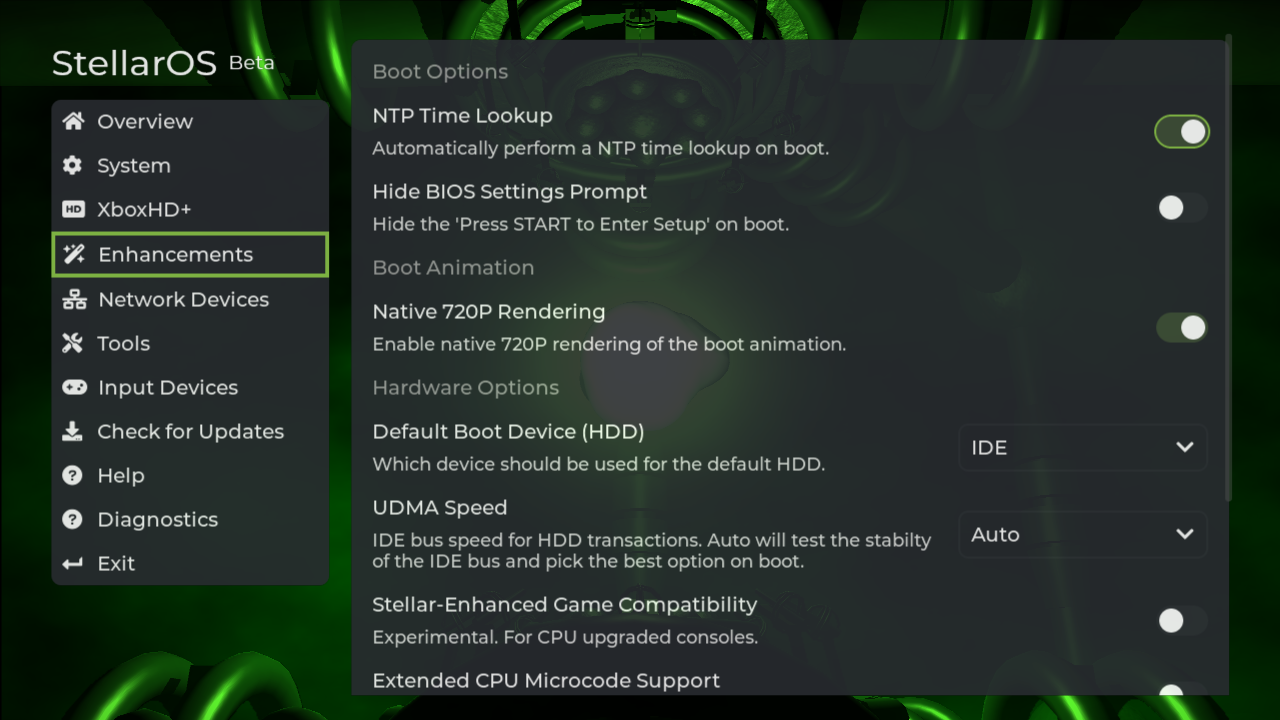
The Enhancements settings page contains all of the configuration options Project Stellar enhancements.
Boot Options
NTP Time Lookup
Automatically execute an NTP time lookup upon startup.
Hide BIOS Settings Prompt
Hide the Press START to Enter Setup on boot.
Boot Animation
Native 720P Rendering
Enable native 720P rendering of the boot animation.
Standard consoles start up with a native 480p resolution. Although rendering directly in 720P offers a crisper visual, it currently results in a reduced frame rate.
Hardware Options
Default Boot Device (HDD)
Which device should used for the default HDD.
UDMA Speed
The IDE bus speed governs HDD interactions. When set to 'Auto', the system will assess the IDE bus's stability upon boot and automatically select the optimal speed.
Original consoles operate with UDMA2.
To achieve higher values, it's typically necessary to employ a superior aftermarket 80-wire IDE cable in conjunction with a Startech SATA to IDE adapter.
Stellar-Enhanced Game Compatibility
This is an experimental feature tailored for consoles with CPU upgrades.
Extended CPU Microcode Support
For consoles with CPU upgrades, this feature ensures the most recent microcode is loaded automatically upon startup.
Extended Retail PFN Support
Allows both retail and homebrew applications to tap into extra RAM resources.
This option must be enabled to use the additional RAM installed on a modified system.
This option will be turned off when in Safe Mode.
Insignia
XBL Game Patch NULL HDD Check
This feature enables your Xbox to connect with Insignia when the HDD key is configured to a value of all zeros.
Verified by the Insignia team.